
The revolution in the world of Artificial Intelligence began with ChatGPT launched by OpenAI. This was later followed by Google with Bard and then by Gemini. Being one of the most popular search engines, Google also introduced a concept called Search Generative Experience. Abbreviated as SGE, it has become both popular and annoying for the searchers. Want to know how to turn off Generative AI in Google Search? Let us try finding out.

Table of Contents
What is Generative AI in Google Search?
Google Generative AI is also known as Search Generative Experience or SGE. It helps you as a smart search assistant. It is actually an experience that appears at the top of your search results.
The SGE uses AI to answer the query that the searcher is looking to find an answer for. That would mean the searcher is given the relevant answer without even the need to visit the web link. The AI can answer practically any question. But, yes, it is still in the early stages of development, and they may not be accurate every time.
If you are uncomfortable with the AI search results or annoyed with the frequently wrong responses, you can turn off the Generative AI in Search.
What Does Generative AI Do on Google Search?
Well, Generative AI is a new technology that does not need you to learn specific machine languages to communicate with computers and machines. You can simply make use of human language or natural language for communicating with your computer.
When you search for something on Google, Generative AI will search from among the other websites and their reviews and other details to provide you’re the relevant answers.
Here is how Generative Search can help you in several ways. A few of the options that can prove to be helpful in several ways:
- It helps you simplify complicated search queries and their results.
- It can help you answer unusual queries.
- It can also help you in translating text from one language into another.
- Tailoring search outcomes to your search preferences.
How to Turn off Generative AI in Search?
Turning off Generative AI in Google Search is much easier. Before you turn it off, do note that Generative AI is not yet launched for everyone. If you are getting Generative AI in Search, it is because you have shown interest and enabled it in the Google Search Labs.
Having said that, you can turn off Search Generative Experience from the Search Labs itself.
Here are the steps you need to follow if you want to turn off Generative AI in Search:
- Launch Google Chrome and make sure that you are logged in to your account. Make sure that you are not in Incognito mode.

- Click on the Search Labs icon. You should find it in the top right corner. The icon would resemble a flask.

- This will open the Google Search Labs. Locate SGE in the Search Labs. Scroll down and locate SGE. It is marked as SGE, Generative AI in Search.
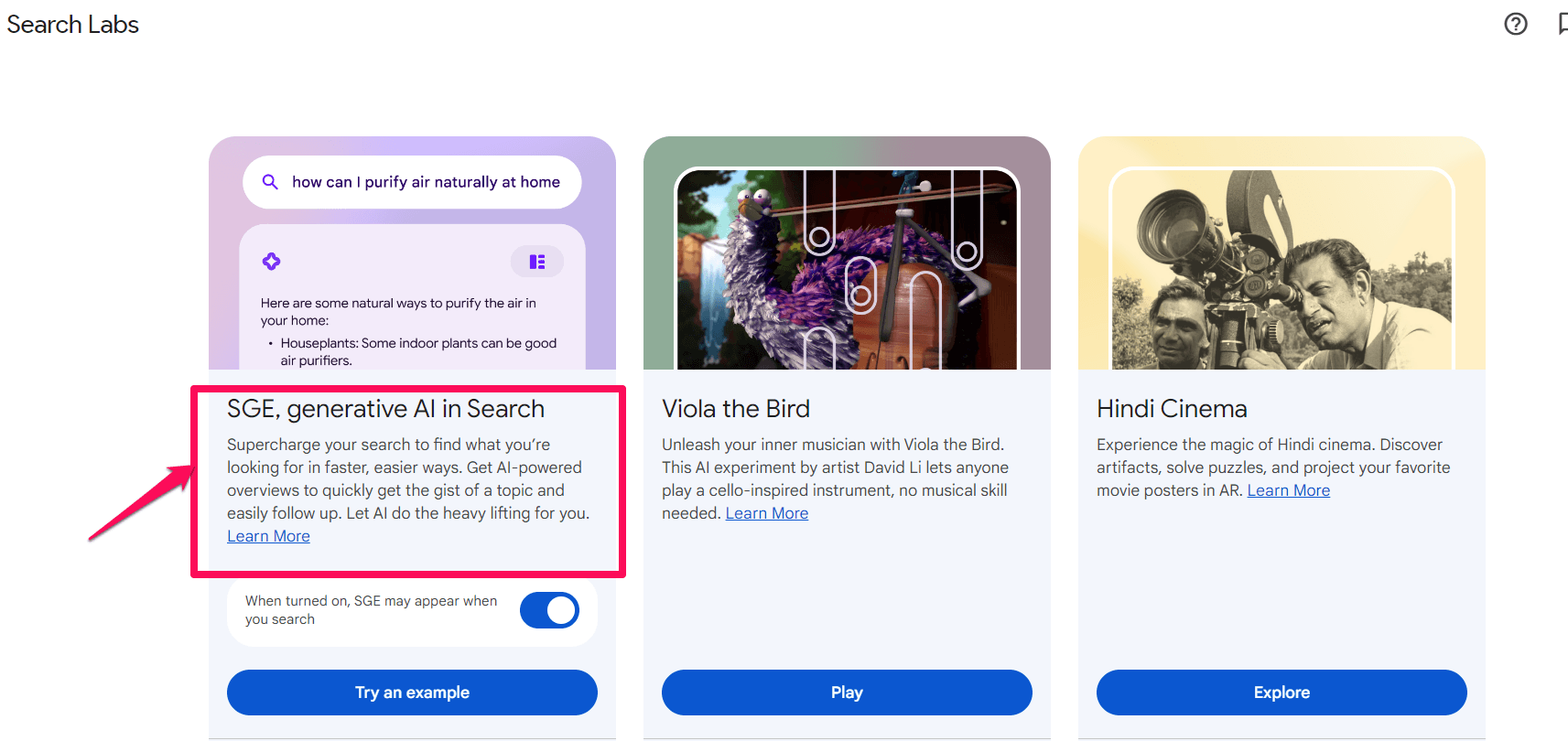
- Turn off the toggle for SGE.
That does it. This will turn off Generative AI in Search instantly.
If you feel like you would want to have Generative AI in Search, you can go to the same section and enable the toggle.
Why Would You Want to Turn Off Generative AI in Search?
There can be several reasons you would wish to turn off Search Generative Experience on Google Search.
Accuracy issues
SGE is still being worked on. The results may not always be right. It learns from the data that it is trained on and can go wrong at times. If you are looking to get accurate search results, you may wish to turn off Generative AI in Search.
Lack of transparency
Another reason that you would wish to have AI search turned off is the lack of transparency in the results. The credibility of the answers may be a concern. If you are concerned about the origin of the information, traditional Search should be the best option that you would wish to work with.
Preference for the Traditional Search
You may be someone who is looking to access the traditional Search, but you would prefer not to have the SGE results.
Issues in navigating
The interface for the SGE may be a little unfamiliar for you or may even get confusing. Disabling SGE can help you navigate your search results relatively easily.
Privacy concerns
Some of you may be worried about how AI may be using your data. In such cases, you may want to disable Generative AI is Search. If you are concerned about the security of the AI tools, you can decide to disable Search Generative Experience in your Google Search.
Your personal preferences
Some of the users may not be comfortable with the use of AI-based search results. In such a scenario, you can simply disable the Generative AI Search in your Google Search.
Conclusion
That was all about how to turn off Generative AI in Google Search. It isn’t a very difficult task, but it can get a little confusing if you are not much tech-savvy. We have outlined the steps for an easy understanding. Check them out and find how was your experience.
FAQs
Why turn off Generative AI in Google Search?
Some of you may not be comfortable with AI in Search. Moreover, the inaccuracies in the AI results may also prevent you from using it.
Is Generative AI a threat?
Generative AI should be used with utmost responsibility. While it may be compelling and practical to work with, it also comes with a few risks or hallucinations and misinformation. It should always be used with care.
Will disabling Generative AI affect other AI features in Google Search?
Disabling Generative AI or Search Generative Search on Google Search can only remove AI results in your searches. Other smart AI features that are integral to your Google products will remain as they are.
Does SGE have any limitations?
SGE is still under development. It may give a wrong and confusing answer at times. It will not work for every query that you throw at it. That apart, it may also result in hallucinations.
